Quote Part D Plans Ranked by the Client's Actual Drug Costs.
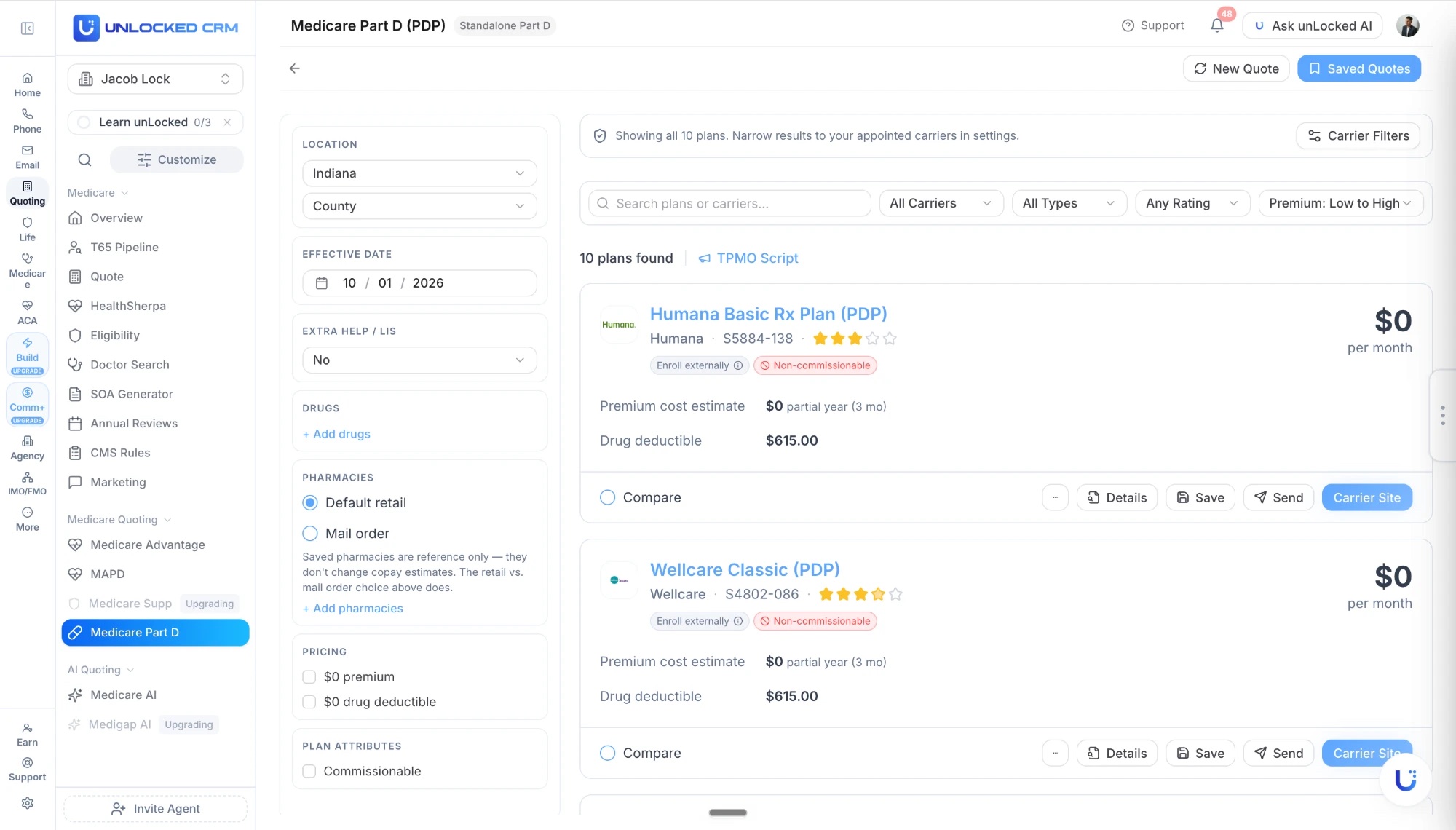
The lowest premium is not the lowest cost. Every standalone drug plan for the county is priced against the client's medications, pharmacy choice, and Extra Help, with commission tags on each card. Every quote saves to the client record, and it is included on every plan.
What the PDP Quote Gets Right.
A $0 premium with a $615 deductible can cost more than a $30 plan. The quoter takes the drugs, the pharmacy, and the subsidy before it ranks anything.
The client's actual drug list
Add medications by pasting, speaking, or photographing the list. AI Drug Assist structures it, and every PDP is priced against it.
Retail or mail-order pharmacy
Choose default retail or mail order and the copay estimates change with it. Saved pharmacies stay on the record for reference.
Extra Help / LIS
Answer the Extra Help question up front so the low-income subsidy is reflected in the drug costs you present.
Premium, deductible, and cost estimate
Monthly premium, the drug deductible, and the partial-year cost estimate for the effective date you chose, on every card.
Star rating and plan ID
CMS Star Rating and the S-number on every plan, so the client sees the same identifiers Medicare.gov shows.
Compare, send, enroll
Tick plans to compare, download the PDF, send the quote by email or SMS, and enroll. Depending on your enrollment platform, the enrollment is pushed straight into it.
Drugs, Pharmacies, and Doctors, Added in Seconds.
Add the client's drugs, pharmacies, and providers on every Medicare quoter. AI Drug Assist and AI Doctor Assist take the lists however they arrive, structure them, and match them for the quote. No one-at-a-time entry.
Paste or upload
Paste a text list or upload an image of medications, pharmacies, or providers.
Voice
Dictate the list during the client call and AI structures it.
Photo
Snap pill bottles, a pharmacy printout, or a referral sheet.
Know Which PDPs Pay Before You Present.
Many standalone drug plans pay no commission or must be enrolled outside your platform. The quoter says so on the card.
Non-commissionable plans tagged on the card before you present
A Commissionable filter that hides them with one click
Enroll-externally plans marked so you know before you start
Carrier and plan-ID rules across all 50 states, no maintenance on your end
When to Quote a Standalone PDP.
Keep PDP quoting separate from MAPD when the client has Original Medicare, Medigap, or needs a clean drug-only review.
Client has Original Medicare plus Medigap and needs standalone drug coverage
AEP review after medication or formulary changes
Pharmacy preference changed and total drug cost needs a fresh comparison
Client wants MAPD separated from standalone PDP options
Quote, Compare, and Enroll in Four Steps.
01
Open the client record
County, effective date, saved drugs, and pharmacy carry into the quoter from the contact.
02
Run the PDP quote
Every standalone drug plan for the county, ranked by premium with the client's drug and pharmacy costs applied and commission tags on each card.
03
Compare and send
Tick plans to compare, use the TPMO script, and send the client a branded PDF comparison by email or SMS.
04
Enroll and follow up
Enroll from the plan card. Depending on your enrollment platform, the enrollment is pushed into it, and the plan and next review land on the record.
Built for Real Medicare Workflows.
The pieces around the quote that usually live in three other tabs.
Eligibility and effective dates
Age-based eligibility checks and effective-date guidance so coverage starts when it can.
Plan-year reviews
When formularies, preferred pharmacies, or medications change, rerun the comparison from the saved drug list in seconds.
TPMO script and CMS rules
The TPMO disclosure is one click from the results, and CMS rules are built into the Medicare workflow.
Branded PDF quotes
Every comparison PDF carries your logo, name, NPN, and phone without any formatting on your end.
Enrollment pushed to your platform
Enroll from the plan card and, depending on your enrollment platform, the enrollment is pushed into it. Carrier links and plan documents stay on the quote.
Ready for AEP, OEP, and SEP
New enrollments, annual reviews, and mid-year changes all run from the same quoter and the same record.
Three Medicare Quoters, One Menu.
Pick the quoter for the plan type. All three share the client's drugs, pharmacies, providers, and record.
Medicare Advantage (MA-only)
Plans without drug coverage. Typically a small share of a county's plans.
See the quoterMAPD
All-in-one Medicare Advantage with Part D, priced against the client's drugs.
See the quoterPart D (PDP)
Standalone prescription drug plans for clients on Original Medicare or Medigap. This page.
See the quoterThree Ways to Quote Medicare.
Same plans, same client record. Pick the path that fits the moment.
The Part D quoter
Every plan
Form-based, county-level PDP quoting with drugs and pharmacy priced in, unlimited and with no per-quote fee. What you see on this page.
Medicare AI
Pro
Describe the client in plain English and get plan recommendations. unLocked AI can run it from chat or by voice.
Your Medicare quoting link
Every plan
A custom link with your name, headshot, and logo. The client quotes themselves and lands in your CRM as a lead with the quote attached.
Part D FAQ
When should I quote a standalone Part D plan?
When the client has Original Medicare, a Medigap policy, or wants drug coverage kept separate from a Medicare Advantage plan. Clients who want an all-in-one plan are quoted in the MAPD quoter instead.
How are drug costs calculated?
You add the client's medications, choose default retail or mail-order pharmacy, and answer the Extra Help/LIS question. Each plan's premium, drug deductible, and partial-year cost estimate reflect that list and pharmacy choice. Saved pharmacies are reference only; the retail versus mail-order choice is what changes the copay estimates.
Do I have to enter drugs one at a time?
No. On every Medicare quoter you can add drugs, pharmacies, and providers by pasting a list, speaking it during the call, or photographing pill bottles, a pharmacy printout, or a referral sheet, and AI structures the entries.
How do I know which PDPs pay commission?
Non-commissionable plans are tagged on the card, plans that must be enrolled externally are marked, and a Commissionable filter hides the $0-commission plans with one click. The rules cover carriers and plan IDs across all 50 states with no maintenance on your end.
How do I send a quote and enroll the client?
Download the quote as a PDF or send it to the client by email or SMS from the results page. To enroll, use the plan card; depending on your enrollment platform, the enrollment is pushed into that platform, and the quote and enrollment stay on the client record. The TPMO script is one click away.
Is the Part D quoter included?
Yes. It is included on every unLocked CRM plan, priced per user, with unlimited quotes. Medicare AI, the plain-English version, is on Pro.
Can clients quote themselves?
Yes. Every agent gets a custom Medicare quoting link branded with their name, headshot, and logo. The client runs the comparison and lands in the CRM as a lead with the quote attached.
Choosing Medicare Part D Quoting Software
Part D quoting software should compare standalone prescription drug plans against the client's actual medications, pharmacy choice, and subsidy status—not premium alone. unLocked's PDP quoter shows premium, drug deductible, partial-year cost estimates, Star Ratings, and commissionability tags, with every saved quote attached to the client record.
- Confirm the drug list, effective date, retail or mail-order choice, and Extra Help/LIS information before comparing plans.
- Review the total estimated drug cost alongside premium and deductible.
- Check formulary restrictions and pharmacy details against current carrier information.
- Distinguish externally enrolled or non-commissionable plans without letting compensation replace client suitability.
Check It In A Demo
Run a standalone PDP comparison from saved medications, inspect the cost estimate and commissionability tag, and save the quote beside the client's Medigap record.
Saved pharmacy records are reference information; the retail versus mail-order selection changes the displayed copay estimate. Enrollment options depend on the connected enrollment platform and plan.