Every Policy in Your Book, Tracked From Application to Renewal.
One record per policy, connected to the client, the producer, the carrier, and the commission. Applications, enrollments, renewals, book of business, and cross-sell in the same six tabs, with AI Insights and bulk upload. Included on every plan.
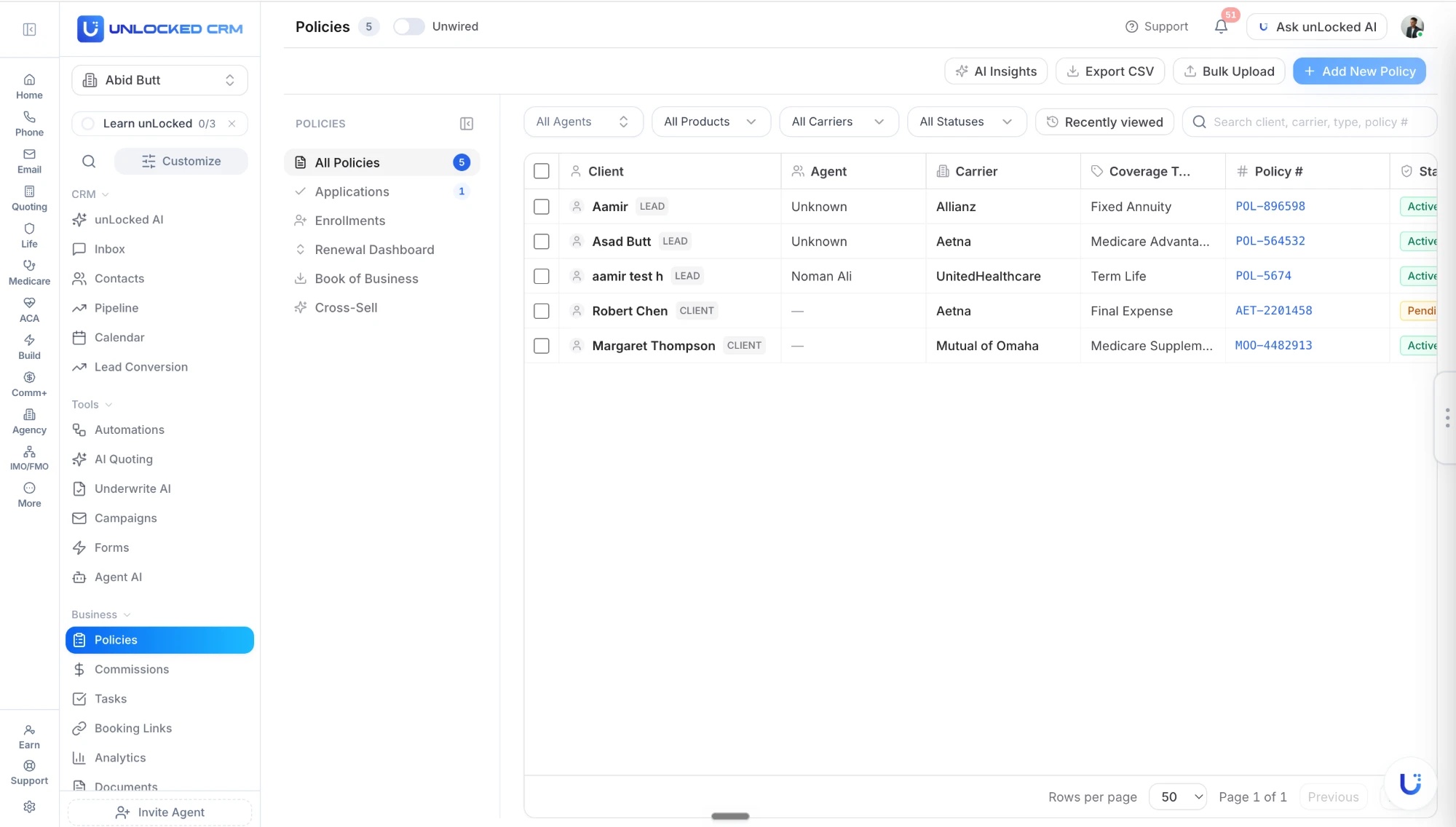
Six Tabs, One Book.
Policies are not documents to file. They drive service work, renewals, commissions, retention, and the next conversation with each client, so the tabs follow that work.
All Policies
Every policy in the book with client, agent, carrier, type, policy number, premium, status, and renewal date, filtered by agent, product, or carrier.
Applications
Submitted applications from quote to issue, so pending business is tracked before it becomes a policy.
Enrollments
Enrollment activity creates and updates policy records, so the book stays current without re-keying.
Renewal Dashboard
30, 60, and 90-day windows grouped by enrollment period, with alerts, risk scoring, and a bulk review workflow.
Book of Business
Carrier imports rolled into one searchable view with premium, carrier mix, retention, and revenue at risk.
Cross-Sell
AI surfaces coverage gaps by household and the product opportunities behind them.
One Record for Every Policy.
Coverage, dates, status, documents, and ownership on the record, and everything else in the CRM connected to it.
What is on the record
- Carrier, product type, and policy number
- Premium and payment mode
- Status: active, pending, lapsed, or review needed
- Effective and renewal dates
- Documents and important dates
- Assigned agent
What it connects to
- The client and the household
- The producer and the agency hierarchy
- The quote and application it came from
- The Commission+ payments reconciled against it
- The tasks, outreach, and workflows it triggers
- Analytics and the report builder
Shape the Record Around Your Team.
Lock records so nothing changes by accident, cut the carrier and product lists down to what your agency actually writes, and order the policy record and the Add Policy form the way your team works.
Read-only record pages
Turn on Read-only record pages under Settings → My Team and contact, policy, and commission records open locked as plain text. Copy a policy number off the screen with no chance of changing it; an Edit button opens the full form with its own Save and Cancel, so a change only happens when someone means it.
Your carriers and products, not ours
Settings → Agency Carrier Rules → Policy dropdown lists gives ACA, MAPD, Med Supp, PDP, Life, and Dental/Vision each their own companies and products list. Type what you actually write and it saves instantly, replacing the built-in list so agents stop scrolling past sixty carriers.
Nothing is lost
The full list stays behind Show all carriers for the rare off-list case, removed values collapse into a line you can restore in one click, and a policy already saved with a carrier you have since removed keeps showing it. Leave a line empty and it keeps showing everything.
Customizable policy view
Hide any card you do not use from its ⋯ menu and bring it back from the hidden cards pill, drag cards into any order by the handle in the left gutter, and reorder the fields inside a card. What you set applies to the whole agency.
Customizable Add Policy form
Hit Rearrange and drag Policy Details fields into the order your team works in, pulling fields in from Primary Information, Coverage Details, Important Dates, or Medicare & Health from their ⋯ menu. Drops save immediately.
Set per product
Each coverage type keeps its own shape, so what you arrange for ACA does not disturb MAPD or Life. One person sets the form up and the whole team fills in the same one.
Renewals Before They Become Last-Minute Work.
The Renewal Dashboard turns the calendar into a work queue, grouped by enrollment period and ranked by risk and revenue.
Renewal timeline
Calendar and list views for policies due in the next 30, 60, or 90 days, grouped by enrollment period.
Review alerts
Notifications for MA reviews, Medigap rate changes, policy anniversaries, and missing client contact.
Retention risk scoring
Clients whose plans had benefit cuts, premium spikes, carrier exits, or no recent contact are flagged first.
Bulk review workflow
Check off clients as reviewed or contacted during AEP prep and track progress across the team.
Revenue-at-risk metrics
The commission value tied to policies still waiting on review, contact, or a decision.
Enrollment period grouping
Policies grouped by AEP, OEP, and SEP windows so outreach is prioritized by urgency.
AI Insights On the Whole Book.
One button on the Policies screen reads every record and comes back with what needs attention and what to do about it.
Renewal reviews surfaced early
AI Insights lists the reviews coming up before they become last-minute work.
Changes that need a look
Policies with status, premium, carrier, or timeline changes are flagged for review.
Next steps, not just data
Policy data becomes recommendations for service, retention, and growth, and unLocked AI can act on them.
Coverage gaps by household
Clients without life coverage, households missing dental and vision, Medicare clients ready for ancillary products.
Get the Book In Without Re-Keying It.
Six ways policies arrive, and one way they leave when you need a file.
Bulk upload
Bring an existing book in from a file and it lands as clean policy records.
Carrier imports
Import carrier files into the Book of Business tab, no manual entry.
Enrollments create records
Enrollment activity creates and updates the policy automatically.
Add a policy by hand
Add New Policy from the list when a case comes in outside the usual paths.
Custom fields
Track service, renewals, and commissions the way your agency does.
Export CSV
Pull the book, or any filtered slice of it, out as a file when you need it elsewhere.
Book Valuation From the Same Records.
When every policy is on a record with its premium and status, the book explains itself.
Premium under management
Total active premium across every carrier in the book.
Carrier mix
Which carriers make up the book, and where concentration risk is building.
Retention
How well policies stay on the books over time, with trend analysis.
Revenue at risk
Policies likely to lapse or cancel, so you can intervene before the revenue disappears.
Policies FAQ
What does Policies track?
One record per policy with carrier, product type, policy number, premium, payment mode, status, renewal date, documents, and the assigned agent, connected to the client, household, producer, and the Commission+ payments reconciled against it. Six tabs organize the book: All Policies, Applications, Enrollments, Renewal Dashboard, Book of Business, and Cross-Sell.
How do policies get into unLocked?
Add them by hand, bulk upload an existing book from a file, import carrier files into Book of Business, or let enrollments create and update records automatically. Custom fields match how your agency tracks service, renewals, and commissions.
How does the Renewal Dashboard work?
It shows policies due in 30, 60, and 90 days grouped by AEP, OEP, and SEP, with review alerts for MA reviews, Medigap rate changes, and anniversaries, retention-risk scoring, revenue-at-risk metrics, and a bulk review workflow for AEP prep. Renewal activity becomes tasks, outreach, and follow-up.
What do AI Insights do?
AI Insights reads the whole book to surface upcoming reviews, flag policies with status, premium, carrier, or timeline changes, and recommend next steps. The Cross-Sell tab finds coverage gaps by household. unLocked AI can act on any of it when you ask.
Does Policies connect to commissions?
Yes. Every Commission+ payment is reconciled against a policy record, which is how missing payments, underpayments, and missed renewals are detected.
Is Policies included?
Yes. Policies is included on every unLocked CRM plan, priced per user. Commission+ reconciliation is on Max.
Choosing Insurance Book Of Business Tracking Software
Insurance book-of-business tracking software organizes issued policies by client, assigned agent, carrier, product, premium, status, and renewal date. unLocked combines carrier-file imports, bulk uploads, searchable policy records, premium under management, carrier mix, retention, and revenue-at-risk views. Policies is included on every plan; Commission+ reconciliation is a separate Max capability.
- Import a sample of the existing book and confirm policy numbers, client associations, effective dates, status, premiums, and assigned agents.
- Filter by agent, carrier, or product and export the same slice for an independent record check.
- Distinguish a pending application from issued business and an active policy from a lapsed one.
- Review carrier concentration, upcoming renewals, household coverage gaps, and outstanding client contact from the same policy records.
Check It In A Demo
Bring in a sample carrier file, find one client's policies, filter the book by carrier, inspect the upcoming review queue, and export that filtered slice.
A book valuation view is not an appraisal or a guaranteed sale price. Import accuracy depends on source data and should be checked. Tracking a policy is different from confirming that a carrier paid its commission.