Insurance Commission Tracking Software. Plug In Your Carrier Logins.
Insurance commission tracking software matches carrier commission statements to policies and agents, applies splits and overrides, and flags payments that are missing or short. In unLocked CRM that is Commission Auto Sync: it logs into your carrier portals, pulls every statement on schedule, and reconciles each payment against the policies in your CRM, with 332 carrier integrations, 296 of them auto-syncing from portal logins. It is included on Max ($247 per user per month).
Auto-Sync in Three Steps.
The monthly ritual of logging into every portal, downloading statements, and matching them in a spreadsheet is the thing Commission Auto Sync removes.
01
Enter your carrier logins once
Add a username and password for each carrier portal in Retrieve. Credentials sit in a Bitwarden-powered vault, and email or SMS two-factor codes are handled on the same screen.
02
Statements pull on schedule
Commission Auto Sync logs in on each carrier's cadence, daily, weekly, monthly, or rolling, pulls the statement, and emails you a digest. Run it on demand any time.
03
Every payment reconciled to a policy
Each line is matched to the policy, agent, split, and override it belongs to in your CRM. Anything that does not match is flagged, not buried.
What Commission Tracking Software Does
Commission tracking software, also called insurance commission software, ingests carrier commission statements, matches them to expected payouts, flags discrepancies, and distributes splits down a hierarchy.
Why Spreadsheets Fall Short
Carrier statement formats are inconsistent
Every carrier has a different CSV or PDF layout.
Chargebacks land late
A spreadsheet updated by hand rarely catches them before the next pay period.
Hierarchy splits compound errors
One missed override at the top mis-pays the downlines below it.
Statement reconciliation takes hours each month
And the hours repeat for each writing agent.
Four Ways Statements Get In.
Auto-sync covers most carriers. The other three paths mean nothing has to be keyed by hand.
Carrier auto-sync
The main path: portal logins pull statements from 296 carriers on schedule, no spreadsheet cleanup.
Statement inbox
Forward statements to your dedicated statement-forwarding email address and they are parsed the same way.
Workflow connectors
Route commission events into the rest of your agency workflows and automations.
File upload
Drop in carrier files for the carriers that do not have a direct feed yet.
New In November 2026
Recently shipped here. Every release is on the Product Updates page.
Commission Auto Sync: About 20 New Carrier Logins
Commission Auto Sync adds about 20 carrier logins, including Mutual of Omaha, Aflac, Foresters, AIG Corebridge, Gerber Life, Americo, National Life Group, Physicians Mutual, Devoted, Anthem, and Aetna SSI. It also now handles carrier two-factor authentication by email and by security questions.
Commissions Hub, Flat-Dollar Commissions, And A Rate Book
Commissions have a hub at /commissions, with flat-dollar commissions and a Rate Book.
Policy Assist And Commission Assist
Paste text and the policy or commission fields fill in, the same way Contact Assist works for contacts.
Read more: The Commission Auto Sync carrier expansion
Everything the Dashboard Tracks Automatically.
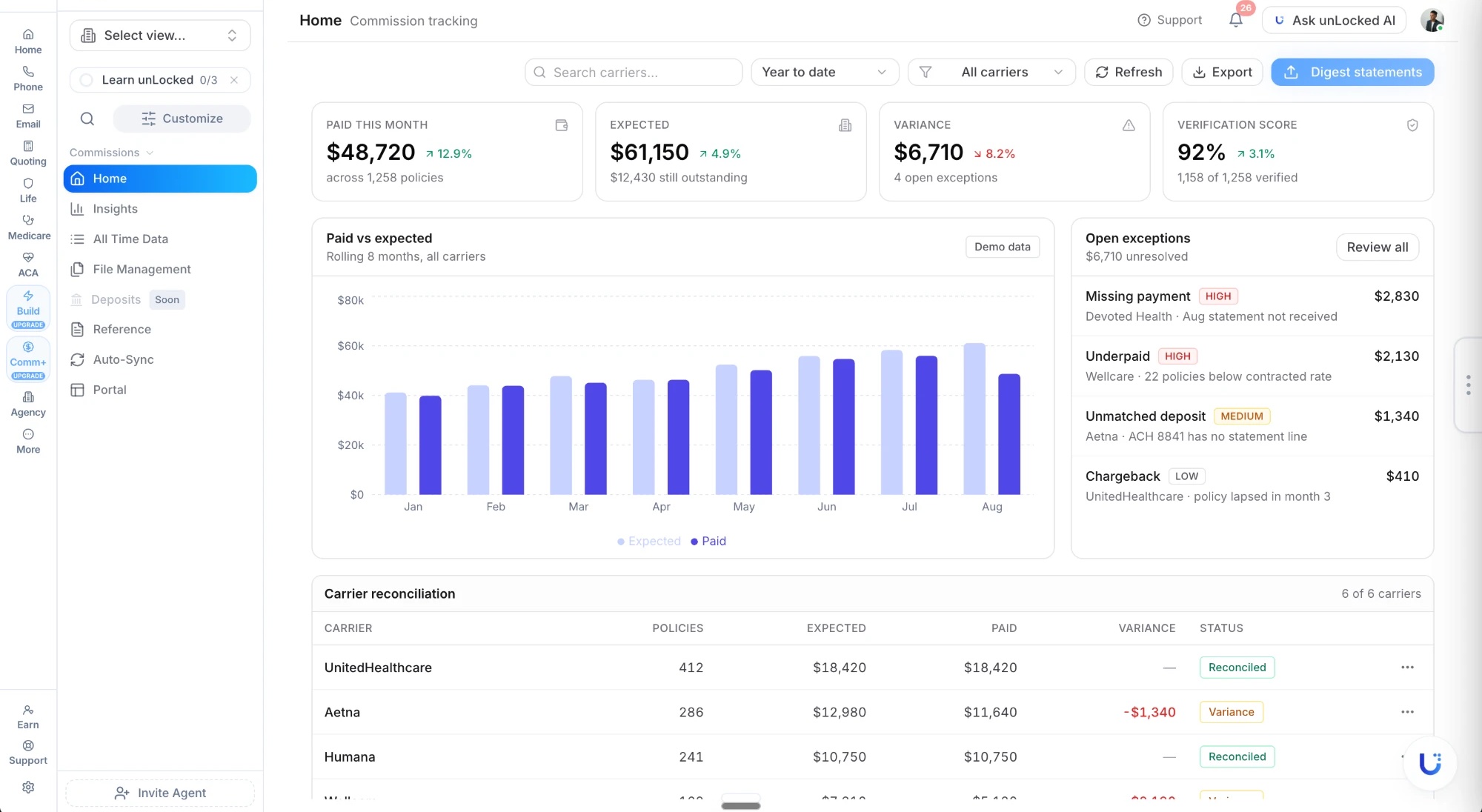
Paid this month against expected, the variance and open exceptions behind it, a verification score across every policy, and reconciliation status by carrier, refreshed as statements sync.
Map statements
Parse carrier statements and normalize the fields that matter.
Retrieve statements
Collect statements from connected carriers on a repeatable cadence.
Unify carrier data
Bring every carrier's format into one commission model.
Detect missing payments
Flag policies that should have paid but have not.
Calculate splits and overrides
Apply comp plans with a clear audit trail.
Report on production
Commission KPIs by agent, carrier, line, and month, without rebuilding reports.
Auto-reconciliation
Incoming payments are reconciled against the policies in the CRM automatically.
Underpayment detection
Received amounts are compared against expected compensation and discrepancies flagged.
The Money You Are Not Being Paid.
Because every payment is matched to a policy, the absence of a payment is visible too.
Missing payments
"Has the carrier paid me on this policy?"
If a carrier has not paid on a policy in the expected window, Commission Auto Sync flags it for review.
Underpayments
"Was I paid the right amount?"
Received payments are compared against expected compensation and the difference is identified.
Missed renewals
"Which renewals silently dropped off?"
Policies that were expected to renew but no longer appear in the payment flow are flagged.
Comp Plans, Splits, and Overrides, Paid Out Right.
Once the statements are in, the hierarchy math runs on top of them.
01
Create comp plans
Rates, renewals, bonuses, chargebacks, and override rules in one place: new business versus renewal, dollar or percentage, chargeback accounting.
02
Assign across the hierarchy
Agents, LOAs, downlines, GAs, MGAs, and partners each get the plan that applies, with manager hierarchies and GA/MGA overrides.
03
Fine-tune with rules
Splits, AOR changes, exceptions, and edge cases handled by rules, so the payout is right without a manual pass.
LOAs receive calculated overrides based on their hierarchy position
Managers get payroll with override breakdowns and team production summaries
Partner splits are distributed through dedicated partner portals
Payroll and accounting exports for Gusto, ADP, and QuickBooks
Agents and Managers See Their Own Numbers.
Every producer gets a portal with pending and paid commissions. Managers see overrides and team production. The status questions stop.
Fewer status questions from agents
Clear payment history by producer
Override visibility for managers
One place to review pending and paid commissions
Book-of-Business Insights From the Same Data.
Once commissions are reconciled to policies, the book explains itself.
Premium under management
Total active premium across every carrier in your book.
Carrier mix
Which carriers make up your book, and where concentration risk is building.
Policy type distribution
Breakdown by product across life, health, annuity, Medicare, ACA, and other lines.
Retention rates
How well policies stay on the books over time, with trend analysis.
Revenue at risk
Policies likely to lapse or cancel, so you can intervene before the revenue disappears.
Client lifetime value
Which clients generate the most long-term revenue, so service effort goes where it pays.
What To Look For
Native carrier integrations
Commission Auto Sync connects to 332 carriers.
Automatic statement parsing
PDF and CSV statements are read without manual mapping.
Hierarchy and override calculations
From IMO, FMO and agency down to the writing agent.
Chargeback handling
Chargebacks and clawbacks are accounted for in the payout.
Variance alerts
Raised when the amount received differs from the amount expected.
Ways To Track Commissions, Compared
unLocked Commission Auto Sync
332 carrier integrations, automatic statement parsing, hierarchy payouts, chargeback handling and variance alerts. Included on Max.
Excel or Google Sheets
Free. Every statement is keyed and matched by hand.
Standalone commission tools
Usually limited to one line of business, such as annuity or Medicare. Check that they cover every line you write.
First confirm your collection method for each carrier, then reconcile a sample payment period before relying on automated totals. Commission Auto Sync retrieves commission statements, and Policy Auto Sync imports the book of business from carrier portal logins; they are separate records. Reconciliation is on Max.
Choosing Carrier Commission Tracking Software
Track insurance commissions by collecting carrier statements, associating payments with policies and producers, applying the agreed new-business or renewal split, and comparing received payments with expected amounts. unLocked Commission Auto Sync connects this work to the policy record and agency hierarchy across 332 carrier connections.
- Collect a representative statement for each carrier and payment period; preserve the source statement for review.
- Check carrier, policy number, writing agent, product, effective date, payment period, and payment amount when matching the statement to the book.
- Configure agreed producer, agency, and override shares, separating new business, renewals, and chargeback treatment.
- Review unmatched entries, missing payments, and differences before using the results for payroll or accounting; check totals back against the carrier statement.
Check It In A Demo
Import a sample statement, match a payment to a known policy and agent, apply the agreed split, inspect any exception, and compare the resulting carrier and producer totals with the source.
Commission Auto Sync retrieves commission statements; Policy Auto Sync retrieves the book of business from carrier portal logins. They are distinct workflows within Commission Auto Sync, not interchangeable evidence of payment. Carrier collection methods vary. Commission Auto Sync reconciliation is on Max; verify your carriers and split scenarios before rollout.
Commission Auto Sync FAQ
What is commission tracking software?
Commission tracking software ingests carrier commission statements, matches them to expected payouts, flags discrepancies, and distributes hierarchy splits, replacing manual spreadsheet reconciliation.
How do insurance agents track commissions?
Insurance agents track commissions by matching carrier statements to policies and writing agents, applying agreed split and override rules, and reviewing expected versus received payments. unLocked Commission Auto Sync supports carrier-statement collection and hierarchy calculations across 332 carrier connections; book imports and commission payments are separate records.
How does auto-sync work?
You enter a username and password for each carrier portal once in Retrieve. Commission Auto Sync logs in on that carrier's schedule, pulls the commission statement, and reconciles every line against the policies, agents, splits, and overrides in your CRM. Email and SMS two-factor codes are handled on the same screen, and a digest is emailed after each run.
How many carriers does Commission Auto Sync track?
332 carrier integrations across life, annuity, Medicare, ACA, and health. 296 of them auto-sync from carrier portal logins; the carrier sheet on this page lists them. The rest arrive through the statement inbox, a workflow connector, or file upload.
Are my carrier logins secure?
Credentials are stored in a Bitwarden-powered vault and used only to retrieve statements. Two-factor codes sent by email or SMS are handled inside Retrieve, so nothing has to be shared by hand.
Does Commission Auto Sync detect missing commissions?
Yes. It reconciles expected commissions against received payments and lists every exception by severity: missing payments, underpayments, unmatched deposits, and chargebacks, with the carrier and the dollar amount, so revenue can be recovered.
Can Commission Auto Sync handle hierarchical overrides and payroll?
Yes. Comp plans are assigned across agents, LOAs, GAs, MGAs, and partners with override calculations, and payroll exports to Gusto, ADP, and QuickBooks.
Which plan includes Commission Auto Sync?
Commission Auto Sync is included with the Max plan at $247 per user per month.
Explore Related Features
Commission Auto Sync
Carrier commission statements pulled on schedule and reconciled to every policy.
Policy Auto Sync
Your book of business pulled automatically from the same carrier portal logins.
Policies
The policy records every commission is reconciled against.
Analytics & Reporting
Production reports and the report builder on top of reconciled commission data.
Carrier Integrations
The 332 carriers behind Commission Auto Sync and the 940 to 1,252 behind the quoters.
Agency Management
The agent hierarchy, downlines, and overrides comp plans are assigned across.
Build
Describe a commission dashboard and Build creates it on the reconciled data.
Articles On This Topic
- How Commission Reconciliation Works: From Carrier Statement to Agent Payout
- Medicare Supplement (Med Supp) Commission Structure Explained (2026 Rates & Data)
- Best Commission Tracking Software for Insurance in 2026
- The ACA Marketplace Agent Workflow: Lead To Commission In unLocked
- AI-Powered Commission Tracking for Medicare Agents (2026 Guide)
- Mortgage Protection Commission Tracking: Lead Vendor Splits & MGA Overrides
- Insurance Agent Commission vs. Salary: Which Pays More?
- AI-Powered Commission Tracking for Insurance Agents: Recover 6–12% of Lost Revenue
- Annuity Chargeback Tracking: Free-Look, Surrender & Death-Benefit Rules by Carrier
- Commission Tracking for Annuity Agents: FIA, MYGA & RILA Commission Structures (2026)
- Medicare Commission Payout Schedule 2026: CMS Caps, Renewals, and When You Actually Get Paid
- AI Commission Reconciliation: How Automation Catches Errors Agents Miss